


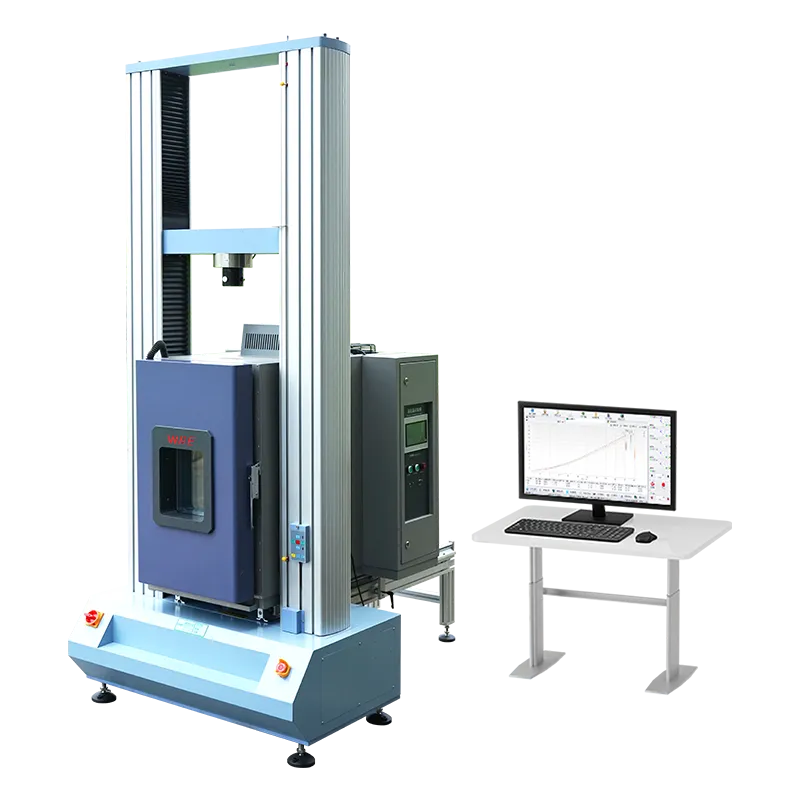
A mechanical testing machine rated Level 0.5 is telling you something specific: that its indicated force stays inside a tight error band across a wide working range, and that its rate control holds the same discipline. It is not telling you that the readout is fine to the last digit. Resolution and accuracy are two different promises, and confusing them is the most common mistake we see when a machine arrives for acceptance.
This guide follows the order a run test actually happens, not the order a specification sheet is printed. We will work through five steps in sequence: what a class really defines, what separates Level 0.5 from Level 1, why resolution is not accuracy, why the machine class is not the sensor class, and finally what to verify on your floor before you sign. Each step builds on the one before it, so read them in order.
The short version, if you only read this far
- A class is a package: indication error, usable force range and rate control are judged together.
- Level 0.5 starts usable measurement at 0.2% of full scale; Level 1 starts at 0.4%.
- A fine resolution number describes the step size, not how close that step is to the truth.
- The frame, the alignment and the control loop are all part of the measurement, so the machine can rate lower than its sensor.
Step 1: What a Class Actually Defines on a Mechanical Testing Machine
A class is not one number. It is a package of three behaviours measured together, and a machine only earns the class when all three meet it. Reading a single figure off a datasheet and calling the machine accurate is where most acceptance disputes begin.
- Indication error — how far the force the machine displays can sit from the true force applied, expressed as a percentage of the indicated value.
- Usable force range — the span of the scale in which the class claim actually holds. Below that floor, the machine is a working instrument but not a certified one.
- Rate control error — how precisely the machine holds the speed you asked for, in force rate or in strain rate, because a test is a rate as much as it is a load.
Put plainly, the class answers three questions at once: is the force reading right, over what part of the scale, and does the machine run at the speed it says. A machine can pass on the first and fail on the third, which is why the rate figure appears in the same table as the accuracy figure. Our electronic universal testing machine carries both figures on one line for exactly this reason.
Once you accept that a class is a package, the next question is concrete: what does that package look like when you compare Level 0.5 against Level 1 side by side?
Step 2: What Separates Level 0.5 From Level 1
Level 0.5 beats Level 1 in three ways that matter to a real test: a wider usable range, a tighter force error, and a slower usable control rate. Here is the comparison as it appears on our own machines, where Model B is Level 0.5 and Model A is Level 1.
| Specification | Model B (Level 0.5) | Model A (Level 1) |
|---|---|---|
| Force range | 0.2% to 100% FS | 0.4% to 100% FS |
| Indication error | ±0.1% / ±0.25% of indicated force | ±0.5% |
| Force rate control | 0.005 to 5% FS/s | 0.01 to 5% FS/s |
| Strain rate control range | 0.02 to 5% FS/s | 0.05 to 5% FS/s |
| Force resolution | 1/500,000 of full scale | 1/200,000 of full scale |
| Displacement resolution | 0.015 µm | 0.001 mm |
| Displacement indication error | ±0.2% | ±0.5% |
Look at the force range first, because that is where the money of a specification sits. On a 600 kN machine, Level 0.5 starts being certified at 0.2% of full scale, which is 1.2 kN, while Level 1 only starts at 0.4%, or 2.4 kN. If your most interesting test loads live in the low end of the scale — small components, thin films, delicate joints — that floor decides whether you can claim the test at all. The tighter error band and the slower usable rate control follow the same logic: they let you run a slower, gentler test and still have it count.
The machine also carries the frame behind those numbers: three force ceilings of 100 kN, 300 kN and 600 kN, a Panasonic servo motor drive, and conformity to GB, ISO, JIS, ASTM and DIN. Which of those ceilings fits your work is a separate question, and we cover it on the mechanical testing machine range.
With the class differences clear, the next question is the one that misleads more buyers than any other: what do all those resolution digits actually promise?
Step 3: Why Resolution Is Not Accuracy
Resolution is the smallest step the machine can display. Accuracy is how close that step is to the truth. A scale that reads to a gram can still be a gram wrong, and a load cell that resolves to a thousandth of the range can still be out of calibration. The two numbers are printed next to each other, which is exactly why people merge them.
- Force resolution of 1/500,000 of full scale means the display can step in very fine increments. It does not mean each step is right. That is the job of the indication error figure from Step 2.
- Constant resolution across the full range, with no range switching, means you never stop mid test to change a setting. You keep one continuous trace instead of stitching ranges together.
- Displacement resolution of 0.015 µm describes how finely the crosshead position is reported. It says nothing about whether the frame is straight or the fixture is aligned.
- The LINE 2500 r/p optical encoder is what feeds that displacement figure. A good encoder improves the step size; it does not correct a bent specimen.
The practical test is simple. Ask yourself what you would do with the extra digits. If your specification only cares whether a part held above a force threshold, a fine resolution does not help you, and a tight indication error does. If you are resolving a slope on a soft material, both matter. Resolution is a convenience feature; accuracy is what a certificate is built on.
If resolution is not the same as accuracy, there is a second version of the same confusion waiting one layer deeper, inside the machine itself.
Step 4: Machine Class Is Not the Same as Sensor Class
You can fit a better sensor than the machine's class and still only claim the machine's class, because the frame is part of the measurement chain. This surprises people. They see a 0.03% F.S. sensor and assume the whole machine is a 0.03% machine. It is not, and it is worth understanding why before you argue the point with a supplier.
Our machines use a TRANSCELL tension and compression explosion proof sensor with an accuracy of 0.03% F.S. That is the sensor's own figure, measured at the sensor. Between the sensor and the number on the screen sit several other parts, and each one adds its own small error:
- Frame stiffness — a frame that flexes under load stores some of the force as deflection, so the load path is not perfectly rigid.
- Crosshead parallelism — the beam is held to a parallelism error of 0.5 mm or better, and any bend introduces a side load the sensor did not ask for.
- Four column guidance — Korean chrome plated guide rods keep the moving crosshead travelling straight, which keeps the specimen loaded the way you intended.
- Closed loop control and the 32 bit ARM control board — the electronics that hold constant stress, strain or displacement across a range of 0.5% to 100% FS, and that translate every reading into a defensible number.
Add those contributions together and a 0.03% sensor can still leave a machine that certifies as Level 0.5. That is not a downgrade — it is the whole system being honest about its own accuracy. A machine that quotes its sensor's number as its own class is quoting a part instead of a product. Our small tensile testing machine follows the same discipline in a compact frame, and the mechanical testing machine guide walks through where each contribution comes from.
Knowing that the class belongs to the whole system, the last step is to prove it on your own floor rather than on a datasheet.
Step 5: What to Verify on Site at Acceptance
Work through this list on the day the machine is installed, in this order. Each item is something you can check with a reference instrument and a few hours, and together they cover almost every dispute we have ever mediated.
- Verify the force range you actually care about, not only the top of the scale. Run a check load near the 0.2% floor for a Level 0.5 machine, because that is the part of the range you are paying for.
- Check indication error against a reference load cell at several points across the range, and write down each deviation rather than a single summary number.
- Check rate control at both a slow and a fast setting. A machine that holds the top speed but drifts at the bottom will fail you on a delicate test.
- Confirm the resolution really is constant across the full scale, with no range switching, by watching the trace during a slow ramp.
- Check displacement indication against a reference extensometer, so the crosshead number and the specimen number agree.
- Check crosshead alignment and parallelism, since a small side load quietly biases every tensile result you will ever run.
- Confirm the standard set the machine is configured for — GB, ISO, JIS, ASTM or DIN — matches the documents you answer to, because the test method and the machine setting have to agree.
Run that list and you will know exactly what you bought. For labs working to automotive supply chain routines, the alignment and rate checks matter most, since the same test repeats across many parts and small biases compound; the automotive testing solutions page shows how those programs are usually structured.
Frequently Asked Questions
Does Level 0.5 mean I can test at any force in the range?
No. The class only holds from 0.2% of full scale upward. Below that floor the machine still runs, but it is not inside the certified band, so a result taken there should not be presented as a Level 0.5 measurement. If your tests live near the bottom of the scale, choose the force ceiling that puts your working load comfortably inside the range.
Is a resolution of 1/500,000 the same as an accuracy of 1/500,000?
No, and this is the most common mix up. The resolution figure describes the smallest step the display can show. The accuracy figure describes how far a reading can sit from the true value. A machine can display very fine steps and still be a half percent away from reality, and both statements can be true at the same time.
If the sensor is 0.03% F.S., why is the machine only Level 0.5?
Because the class belongs to the whole system, and the sensor is only one link in it. Frame stiffness, crosshead alignment and the control loop all contribute error on top of the sensor. The machine's class is the honest total, not the best single component inside it.
Do I need Level 0.5 if I mostly run routine tests?
Not always. If your loads sit in the upper half of the scale and your tolerances are wide, a Level 1 machine can be the sensible choice and easier to justify. Level 0.5 earns its place when you work at low loads, run slow control rates, or need the tightest defensible error band on the certificate. Match the class to the test, not to the label.
A mechanical testing machine is a system, not a sensor with a frame attached, and its class is the sum of every part in the chain. Read the force range before the resolution, treat the class as a package, and test the machine on your own floor before you sign. Do those three things and the numbers will mean what you think they mean.
Match the class to the test you really run
Tell us your peak force, the lowest force you need to resolve and the standards you answer to, and we will point you to the right Level 0.5 or Level 1 configuration.
See mechanical testing machines Send us your test matrix